OpenCulturas 3.1

Enhanced search function, location area options, AI attribution, cookies management accessibility

A person is standing on a rock in a moonlit lake, pointing a torchlight to a starry sky
Column

Enhanced search index

All indexable entities now have a dedicated search index display, including paragraphs. View and block paragraphs now deliver no more clutter into the database search index.

Until this version, all content was basically “indexed as rendered”. This meant that when you wanted e.g. your location overview page to pop up in a search, the complete view containing the map and list including geolocation had been indexed. This meant a heavy burden for the search index and depending on how much content you have, a big search index in your database and might have resulted in slower searches.

Please note that you should check the status of your search index. (Check /admin/config/search/search-api/index/content with an admin account.) To put the update in full effect: Queue all items for reindexing

Publication date
Author

Locations can now be an area, not just an address

Until now, an event location always had to resolve to a single street address — which never quite fit for city-wide festivals, hiking routes, or anything else that doesn't sit at one pin on a map. The usual workaround (typing just a city name into the address field) left a marker sitting at a "location" that wasn't really the location at all.

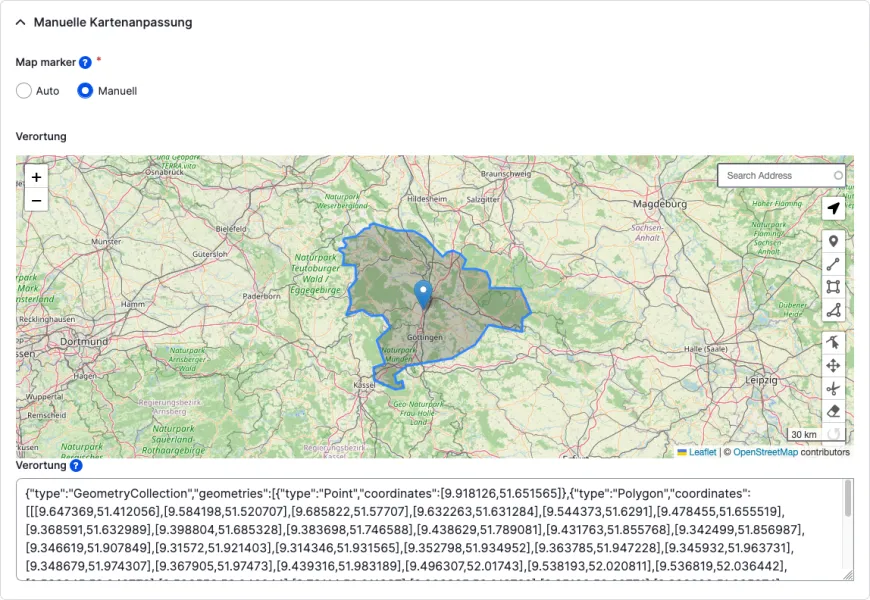
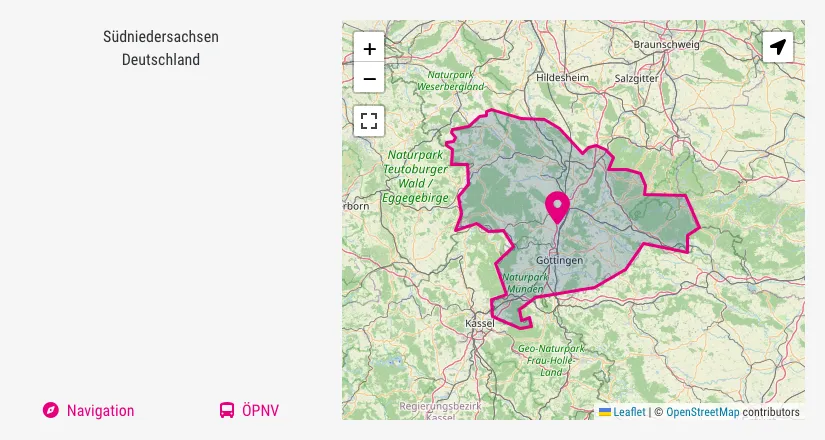
The new Manual map settings section following the address fields has a simple Auto/Manual switch and an editable map. Leave it on Auto and nothing changes — the map marker keeps following the address as before. Switch it to Manual and the map is yours: draw a boundary for e.g. a festival ground, or just place a marker wherever you like, independent of what's typed in the address field. The location map opens on the region your site actually covers by default, and editors can search for an address or use "locate me" directly on the map while placing a marker. 

“Manual” locations are excluded from automatic address-based geocoding in both directions; proximity/radius search still works for them, matched against the center point of the drawn shape.

Existing locations are unaffected and default to Auto automatically on update.

Please note: Manual map settings are accessible for users with the role OC Admin. If you want to give users with other roles this capability, you must change the following two field permissions in the Address data paragraph type under /admin/structure/paragraphs_type/address_data/fields

  • Map marker
  • Address location

Compliance for AI-generated media assets

Another major implementation phase of the EU AI Act took effect on August 2, 2026. To enable media to be labeled “in an appropriate manner”, OpenCulturas offers the option to include information about AI usage in addition to a media item’s license (e.g. image, video, document). The following information can be entered:

  • Creation type: Human-created, AI-generated, AI-modified (defaults to "Unspecified"; upon selecting one of the AI types the following fields are revealed)
  • AI tool
  • AI prompt
  • Prompt editor (name and link)

In good open source manner, we made this contribution to the generic 3rd-party module Attribution. Both OpenCulturas themes have been updated to make this additional information look good.

Image editor pro tip: Bulk edit

If you want to quickly edit your given AI-generated assets, go to your Media library at /admin/content/media:

  1. Multi-select the assets in question with the checkboxes
  2. Below the table, select action Modify field values, click the Apply button
  3. On the next page, activate the field Attribution, select the appropriate Creation type and optionally fill in further fields that all assets have in common.
  4. To save, click the Apply button

Menu link  attributes

You can now add a target attribute and classes to menu list items and links for every menu entry. 

  • Use a container class to highlight a menu entry including sub-menu links
  • Use a link class to e.g. add a dedicated menu link icon (see the calendar sub-menu at CMS Garden)
  • Link target: Explicitely open a link in a new tab/window. For accessibility reasons, please do not forget to add a hint to the link text (“opens in new tab”)
Image
The horizontal menu shows 4 links with icons: In-person events, Online events, Past dates, and Deadlines

CMS Garden uses menu link classes to prepend each link with an icon on calendar-related pages

Consent (cookies) management improvements

We took the opportunity of an update to the new major version of the Cookies module to make a few improvements. Accessibility tests had rightly pointed out that some elements were semantically incorrect and not accessible, namely:

  • Empty links that should be buttons
  • Behaviour of the settings dialog

Furthermore, it was difficult to figure out where to adjust the settings so that the cookie banner wouldn't cover relevant pages and, of all things, make them inaccessible (namely Privacy policy and Legal information).

We developed the module Cookies Popover that solves those issues and that is automatically installed with the update.

What you should do

To transform the given menu link/s to buttons, edit the footer menu (via contextual link or Structure > Menus > Footer (/admin/structure/menu/manage/footer), here edit the link "Privacy settings" (or maybe "Cookie settings"):

  • Menu link title (= the visible button text) unchanged or whatever suits your site
  • Link: <button> (including the brackets)
  • Expand Attributes, enter as Link class: editCookieSettings (exactly like that, otherwise the button won't work)
  • Save

That's it. The Footer menu is re-used in the "burger menu", therefore the new button appears there, too.

Check cookie settings

Go to Configuration > System > COOKiES (/admin/config/system/cookies/config)

  • Is there a link to the privacy policy?
  • Is there a link to the legal information page?

Then open both pages in an anonymous browser window: Does the cookie banner pop up? If yes, something went wrong. Maybe the links in the cookies settings do not point to the page/s in question. Check back at Structure > Block layout (/admin/structure/block), Block Cookies UI (region Branding by default). The system links of the two pages ("/node/[nid]") should be listed as restrictions under Pages.

Bug fixes

Besides some edge-case CSS bug fixes and enhanced white space defaults, we have fixed the following:

  • Comments placeholder: We accidentally placed the comments placeholder in all commentable entities' layouts without checking whether the OC discussions module had been enabled after all. This lead to an error message: “This block is broken or missing. You may be missing content or you might need to install the original module.” The update fixes this error: the placeholders are removed when the feature is disabled.
  • Translations: The ability to place layout blocks in the new design led to some strange translation errors. Some imported translations were apparently assigned incorrectly, and in some cases, the English titles were even explicitly saved again as German translations. This issue should have been resolved by the update.
  • Past dates: The calendar archive entries did not show the state, e.g. "Postponed", thus making every event date look like it actually took place. Fixed.
  • Bugfixes related to error “Non-translatable fields can only be changed when updating the original language”: this occured when trying to add or change translation of content types containing values in opening hours, duration, or a date repeat rule. The triggered error message is quite misleading; we have eventually found the cause and the problems have been patched.

Deprecations

Mentioned in this article

Image
Several bundles of colorful balloons rising into a cloudless blue sky

Deprecation notice: Contact form

What you need to know about the upcoming removal of contact forms

Drupal core is deprecating the contact module. Read about our reasons to not replace it and about your options.